


Case study · Challenge Day 1
ShippedNewsletter Automation
"Signal over Noise" — give it a topic, get a finished newsletter.
- Python
- Perplexity
- Claude
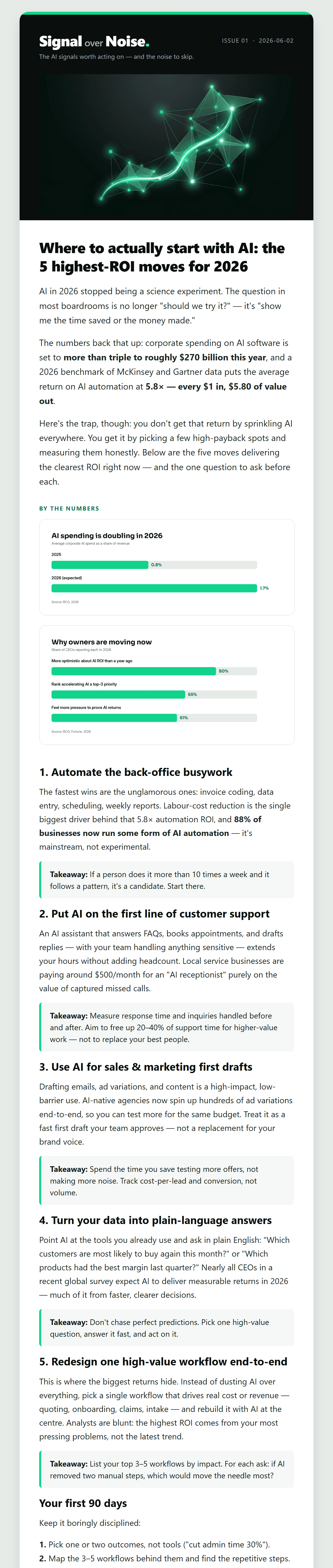
A good newsletter is hours of work: researching the topic, writing it, building the charts, laying it out as an email, and checking it before it goes. This takes a single topic and does all of that automatically — researched from real sources, written in a set brand voice, with accurate charts and a header image — then hands back a finished email, ready to send. Here's a real one it produced:
The problem
Automating this well is harder than it looks. Hand the whole job to an AI and it gets unreliable — models invent figures, garble chart labels, and produce email layouts that break in half the inboxes that open them. The interesting part isn't that AI writes the words; it's building it so the result is genuinely accurate and ships every time.
The goal: a pipeline that takes a single topic and returns a finished, on-brand, fact-checked issue — without the failure modes.
Under the hood
How it's actually built. The plain version is above — everything from here down is the technical detail, for anyone who wants to see how the pieces fit.
How it works
Seven stages, each owned by whichever layer is right for the job — reasoning where judgment matters, deterministic code where exactness matters.
| Stage | How | Why |
|---|---|---|
| Research | Perplexity Sonar (sonar-pro) → cited synthesis + sources | real, current facts with attribution |
| Write | LLM reasoning → structured content JSON in a defined brand voice | the creative / judgment layer |
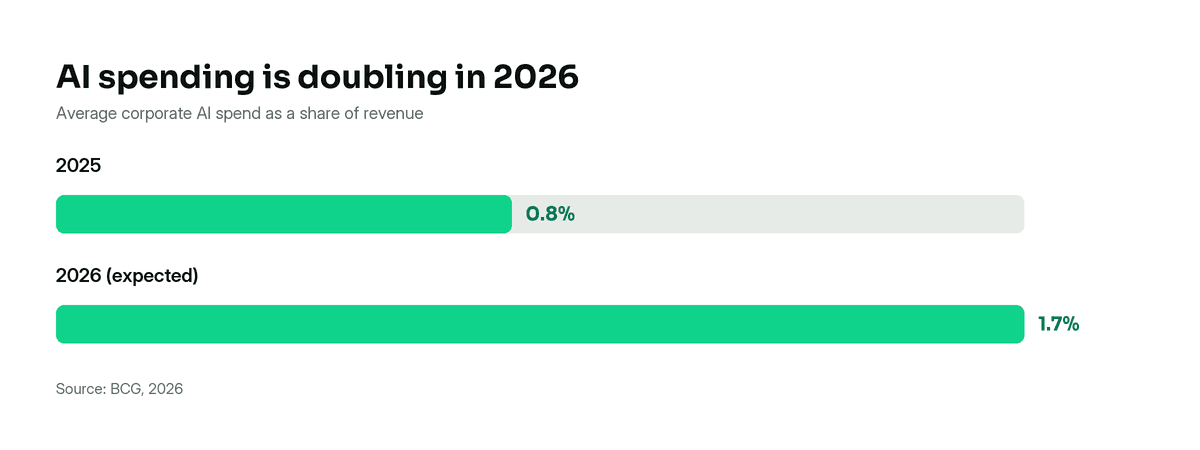
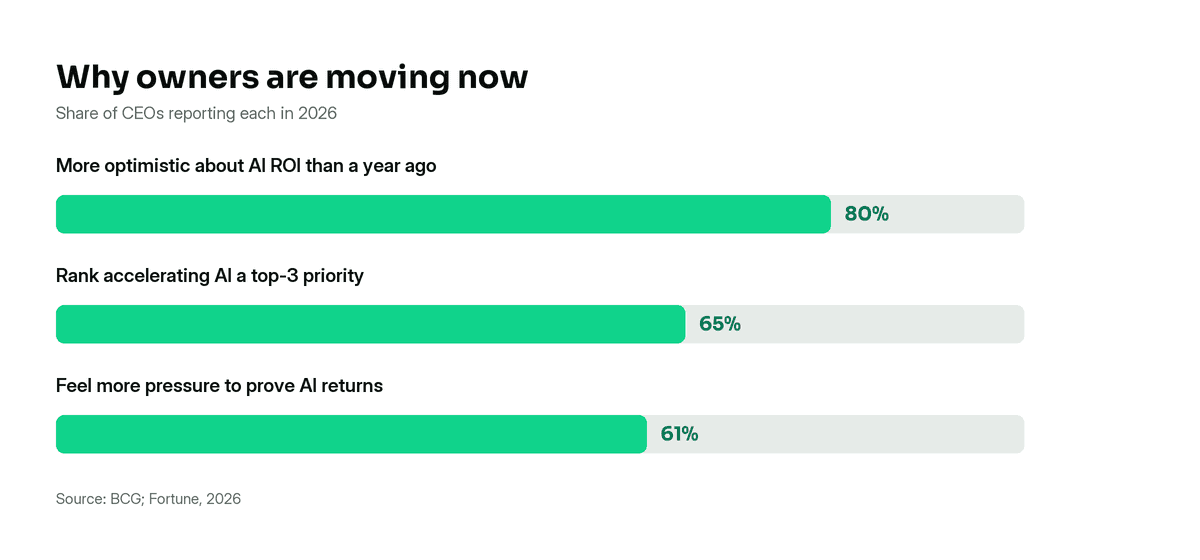
| Charts | code (Pillow + brand tokens) → PNG | diffusion models garble numbers and labels — data viz must be exact |
| Hero image | an image API — editorial art only, no text | the one place generative imagery actually fits |
| Assemble | content JSON → email-safe HTML (inline styles, tables, ~600px, hosted PNGs) | renders consistently across email clients |
| Verify | headless Edge/Chrome → full-email PNG | nothing sends unseen |
| Send | test channel (Gmail) for drafts; an ESP for production | swappable send slot |
Why it's built this way
The architecture is probabilistic where it should be and deterministic where it must be— that split is what makes it reliable. The model writes and synthesises; code handles anything where being slightly wrong isn't acceptable.
Every provider is a swappable slot: the research engine, the image generator, and the send channel can each be replaced without touching the rest of the pipeline. That's the integration-architecture thinking the whole system is meant to demonstrate.
The charts are code, not generated
This is the decision that matters most. Image models are great at editorial art and terrible at data — they'll happily invent a fourth bar or misspell an axis. So charts are rendered in code from the content JSON, using the real brand tokens and fonts. The numbers are exactly the numbers.
The tools
Each stage is a small, testable Python tool — the deterministic execution layer of the WAT framework (Workflows · Agents · Tools).
research_topic.pyPerplexity Sonar → cited research JSONbuild_charts.pycontent JSON → on-brand PNG charts (real fonts via Pillow)build_email_html.pycontent JSON → responsive, email-safe HTMLpreview_email.pyHTML → PNG via headless browser (the verify gate)host_image.pylocal image → public URL (email needs hosted images)brand_kit.pyloads the brand tokens + fonts (shared helper)
Taking it to a real audience
A test send to your own inbox is not production — and knowing the gap is part of the work. Before a real list this needs: a proper ESP (not personal Gmail), a working unsubscribe link, a physical postal address in the footer (CAN-SPAM / GDPR / CASL), honest opt-in wording, an authenticated sending domain (SPF / DKIM / DMARC), and permanent image hosting (generated-image URLs expire). Those are tracked as the go-live checklist.
Want the full walkthrough?
Open the live issue, or get in touch and I'll talk you through the architecture.